Free · Open source · Read-only

Kubernetes logs,
no drama.

Stop scrolling through kubectl logs | grep. LogDeck colors every level, groups the errors and shows what happened before the crash — using the kubectl you already have.

v1.6.2 · macOS, Windows, Linux · MIT

LogDeck
ERROR6× Apache → PHP-FPM timeout
Read-only: get & logs only

Works with any cluster your kubectl can reach

From a wall of text to the answer

The same pod, the same logs. One way you hunt; the other way it is already on the screen.

Before
$ kubectl logs -f portal-web-7d9f | grep -i error
With LogDeck

See it in 30 seconds

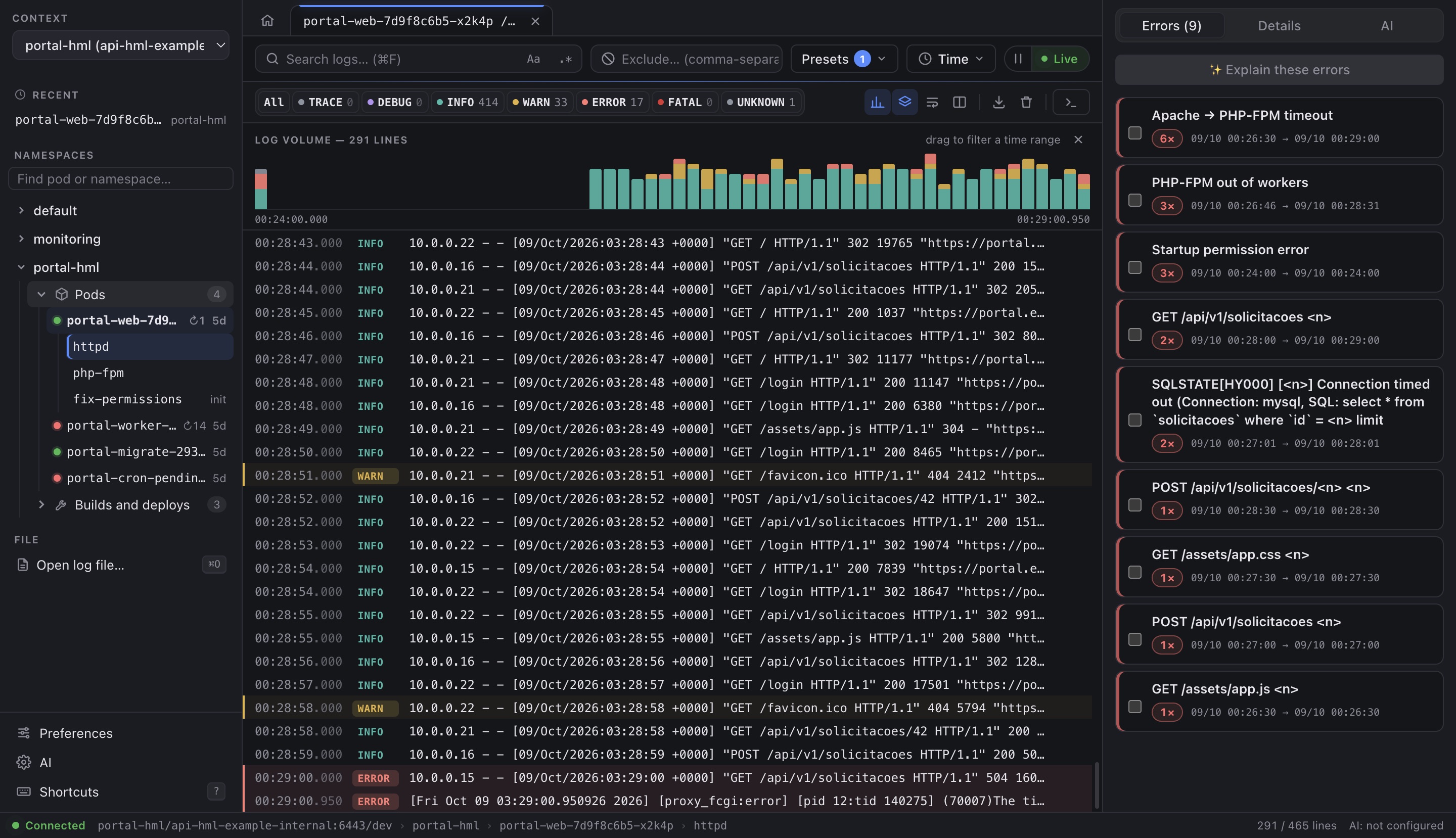
Live logs

Every level in its color. Every spike in sight.

TRACE to FATAL for JSON, Laravel, Apache, Nginx, PHP-FPM, Java and plain text, with stack traces kept together.

  • Volume histogram: drag across the bars to see only that time range
  • Search by text or regex, exclusions and per-namespace presets
  • Reconnects by itself; finished pods are read once
Grouped errors

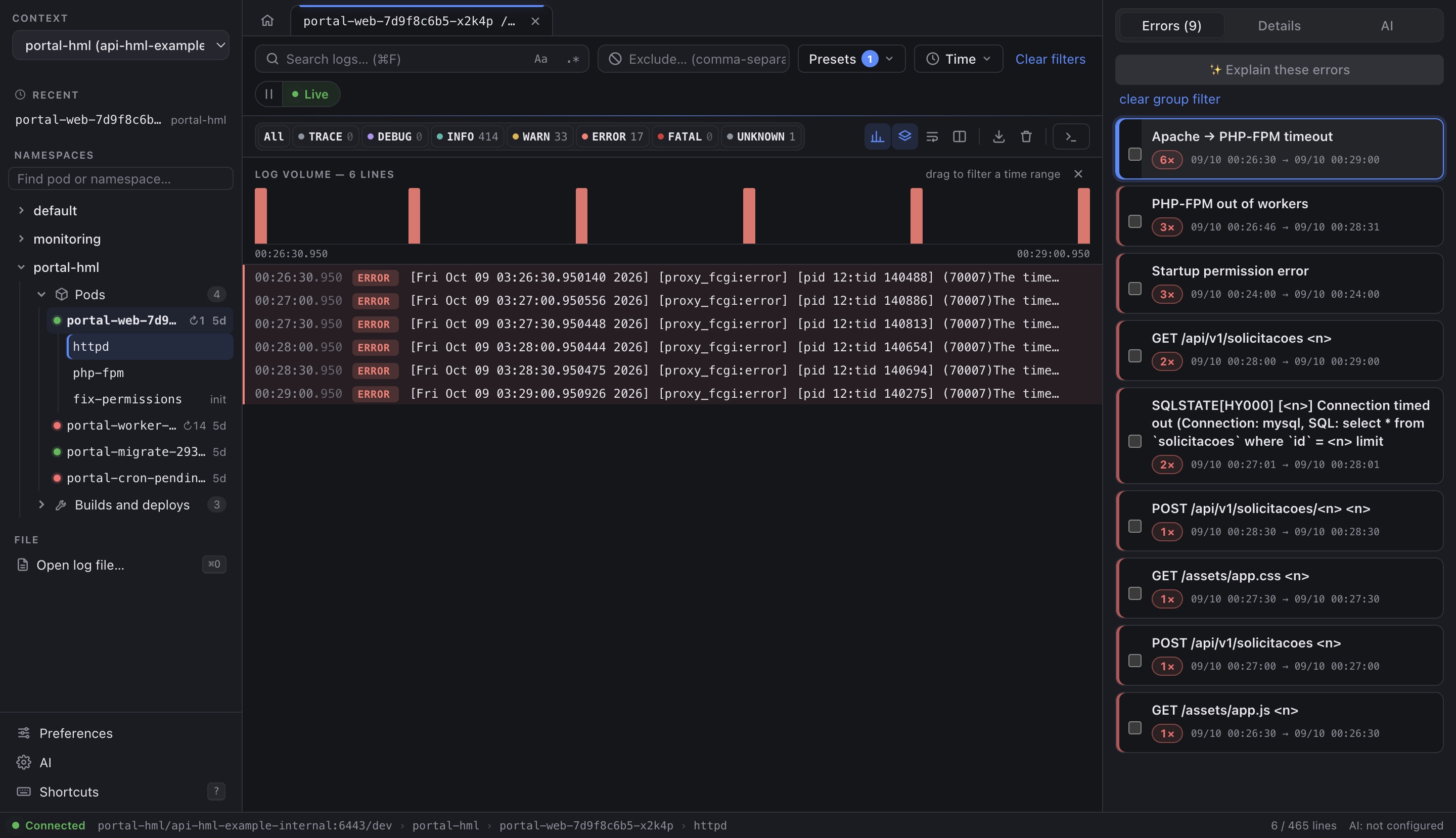
Hundreds of lines. Nine problems.

The same error becomes one card with its count and time range, with numbers and IDs normalized.

  • Click a card to filter the log to it
  • Timeouts and connection errors stand out
  • Optional: ask the AI to explain them, after a masked preview
Crash loops

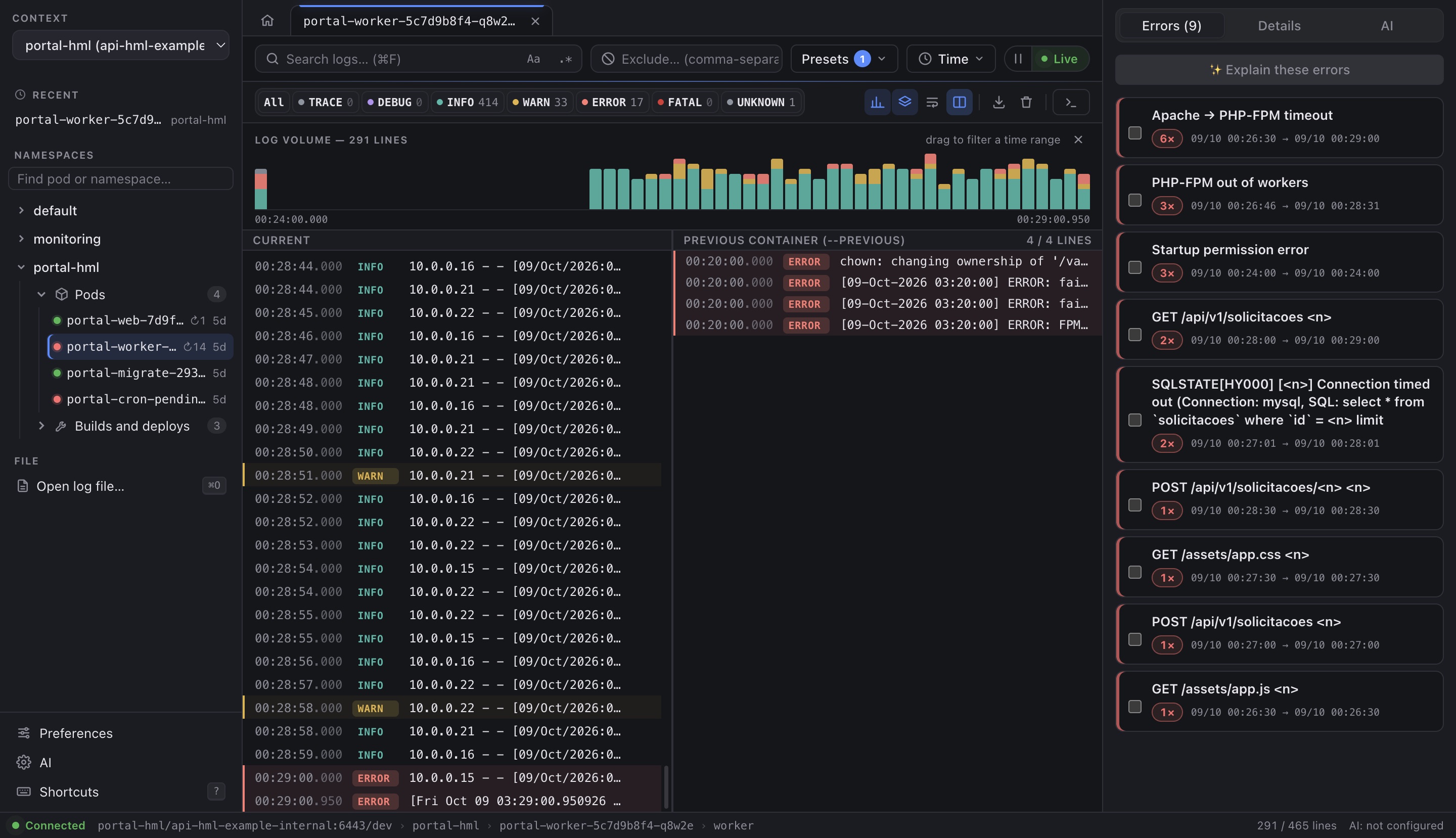
What happened before the restart?

When a pod keeps restarting, compare the current container with the previous one (--previous), side by side.

  • Restart count and status right in the sidebar
  • Init containers and every container of the pod
  • Tabs keep several pods open at once
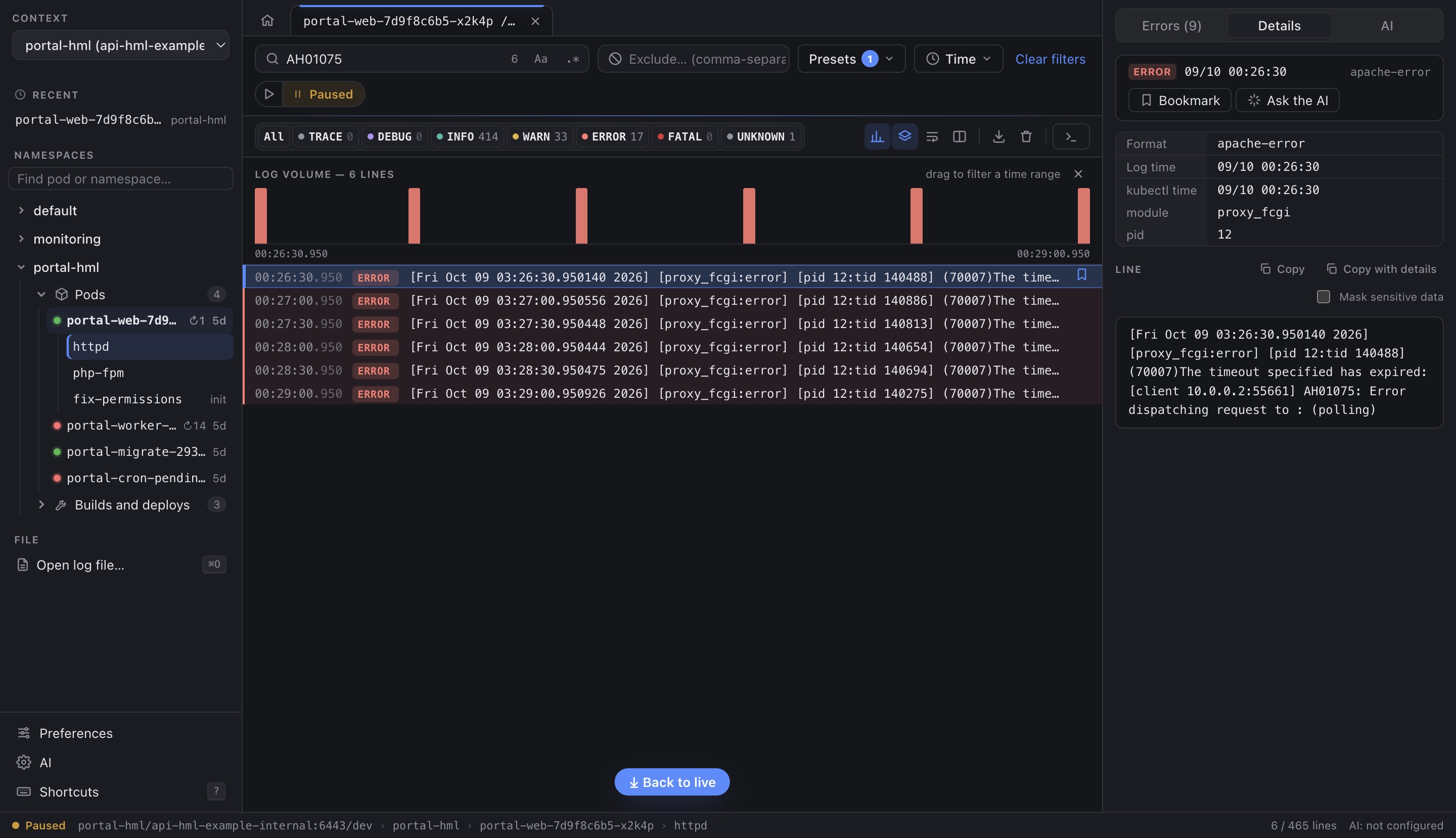
Line details

Everything about a line. Safe to share.

Click a line to see its parsed fields and the full message, then copy it as is or with details for a ticket.

  • Mask sensitive data: secrets, e-mails and internal IPs
  • Bookmark lines while you investigate
  • Open saved log files too, with or without --timestamps

And the small things that add up

Tabs & recents

Several pods open, the last ones one click away.

Terminal on click

kubectl exec into the container, only when you ask.

PROD flagged

Production contexts get a red PROD mark.

Your contexts

Rename or hide them inside LogDeck only.

9 themes

Dark, light, high contrast, Dracula, Nord, Tokyo Night and more.

Keyboard first

Shortcuts for search, matches, levels and tabs.

4 languages

English, Spanish and both Portuguese variants.

Drop a file

Drag a .log onto the window to open it.

Security

Read-only. Never touches your cluster.

Your kubectl, your kubeconfig

No agent and nothing installed in the cluster. Every call uses --context; your current context never changes.

Only read verbs

kubectl runs only with get, logs, auth can-i and version. Any other verb is blocked in code, and CI fails if that changes.

No account, no telemetry

Nothing leaves your machine unless you click. The new-version check is opt-in.

AI only on click

Optional. You see the masked text and the destination before anything is sent.

Read the security details →

Download

Get LogDeck

Version 1.6.2. All files and SHA-256 checksums are on the releases page.

Your system

macOS

Apple Silicon or Intel. Homebrew installs kubectl too.

brew install --cask wisecort/tap/logdeck

Not notarized by Apple yet: on first launch, allow it in System Settings → Privacy & Security → Open Anyway, or run:

xattr -dr com.apple.quarantine /Applications/LogDeck.app
Your system

Windows

Windows 10 or 11, x64.

Microsoft Store

Recommended: signed by Microsoft, no SmartScreen warning, updated by the Store.

The .exe is not signed yet: if SmartScreen warns you, click More info → Run anyway. Installs for your user only.

Your system

Linux

x64. Debian/Ubuntu, Fedora/RHEL or any distribution.

sudo apt install ./LogDeck-1.6.2-amd64.deb
sudo dnf install ./LogDeck-1.6.2-x86_64.rpm

The AppImage needs libfuse2 on Ubuntu 22.04+ (libfuse2t64 on 24.04).

You also need kubectl

And a kubeconfig with access to your cluster (~/.kube/config or KUBECONFIG). If kubectl is missing, LogDeck shows these commands for you.

macOS
brew install kubectl
Windows
winget install -e --id Kubernetes.kubectl
Linux
sudo snap install kubectl --classic

Questions

Is it really read-only?

Yes. LogDeck only runs kubectl with get, logs, auth can-i and version; every other verb is blocked in code, and a check in CI fails the build if that ever changes. The one exception is the container terminal (kubectl exec), which opens only when you click it.

Which clusters does it work with?

Any cluster your kubectl can reach: EKS, GKE, AKS, on-prem, kind, minikube, k3s… LogDeck uses the contexts in your kubeconfig and your existing logins.

Does it send my logs anywhere?

No. There is no account and no telemetry. Logs only leave your machine if you use the optional AI and click Send, after reviewing a masked preview that shows the destination.

Why a desktop app?

So it can use your local kubectl and credentials with nothing to deploy in the cluster, and work the same on macOS, Windows and Linux. It is built with Electron, so it is not tiny, but it is one app everywhere.

Is it free?

Yes. LogDeck is open source under the MIT license, with no paid tier. A star on GitHub and feedback are the best way to help.

Like it? Give it a star.

A star helps more people find LogDeck. Bugs and ideas are very welcome.